Boys and girls, the plan is simple. I’m a self-appointed AI skeptic. Will I use AI and agents and MCP-servers? Sure, when it works properly. The only problem I have is that it’s beginning to look a lot like it works pretty well, so that’s what I want to test.
For my presentation at the Nordic Infrastructure Conference and the following Microsoft Security Summit I did some light testing of the MCP capabilitis in VSCode and that’s what I’m here to talk about.
What is detection engineering?
This is not the post for that. I will give you some resources, so either check out my blog called Practical Detection Engineering, or head over to some of these other amazing resources:
- Series: Detection Engineering: Practicing Detection-as-Code by NVISO Labs
- Blu Raven Academy Blog by Blu Raven (filter for detection engineering)
- Detection Engineering Lifecycle by Maksim Goldenberg on detect.fyi
In short, detection engineering is a discipline that’s all about making sure our worries about what might happen to us are represented in our detection coverage. It’s a field that covers a lot of different skillsets depending on region, company size and your companys needs.
Detection engineering is mostly practiced as a “detection creator” role, but it also plays a helping hand in determining detection gaps, missing data (blindspots where we are lacking both insight and detections), formulating queries for threat hunting, incident response and a lot more.
Introducing some concepts
Model Context Protocol
Starting at the beginning, there is one thing we need to tackle - namely MCP or Model Context Protocol. This was recently made open-source by creators Anthropic and is the de-facto standard for connecting AI applications to external systems. An apt example of this is that it allows a chat AI interface, or your agent in your IDE (like VSCode) to interact via the MCP with other systems such as directly querying your notion docs or updating your calendar.
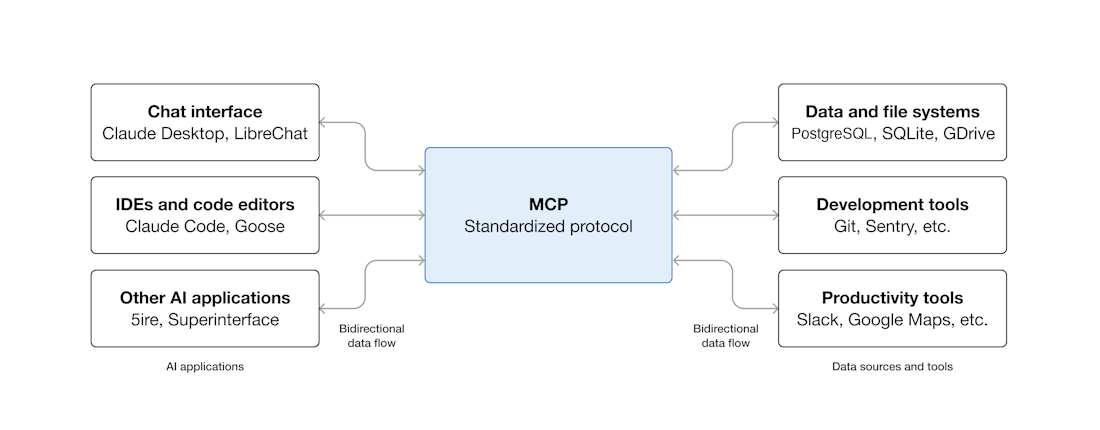
An apt security example is the Microsoft Sentinel MCP server which allows us to do query data in the Microsoft Sentinel Data Lake and the Microsoft Sentinel Graph. The current tool collection is as follows (but more is likely on the way):
- Search for relevant tables
- Retrieve data
- Analyze entities
- Create Security Copilot agents
- Triage incidents
- Hunt for threats
You can also create your own custom tooling from KQL queries. There are also some features in preview here, namely MCP tools for the Microsoft Sentinel Graph.
If you want to learn more about MCP, head over to the MCP for beginners repository.
Microsoft Sentinel Graph
Recently made GA as of December 1st, Sentinel Graph is described as:
“a unified graph analytics capability within Microsoft Sentinel that empowers security teams to model, analyze, and visualize complex relationships across their digital estate. Unlike traditional tabular approaches, Sentinel graph enables defenders and AI agents to reason over interconnected assets, identities, activities, and threat intelligence—unlocking deeper insights and accelerating response to evolving cyber threats.”

The idea then is to allow for defenders to not only rely on the graph for investigation and threat hunting, but also proactive security work. Exposing this to an agent via MCP tooling allows us to let agent reason over the graph alongside our security data in Defender/Sentinel.
The relevancy of the graph for detection engineering depends on how far you want to stretch the use case, but threat hunting and proactive security work it will most likely be a huge boon. The MCP tooling that comes with the preview is currently the two following categories:
🛠️ Custom graph
“Author notebooks to model, build, visualize, traverse, and run advanced graph analyses like Chokepoint/Centrality, Blast Radius/Reachability, Prioritized Path/Ranked, and K-hop. It’s a transformative leap in graph analytics, fundamentally changing how security teams understand and mitigate organizational risk by connecting the dots in their data.”
🤖 Sentinel graph MCP tools
“Use purpose-built Sentinel graph MCP tools (Blast Radius, Path Discovery, and Exposure Perimeter) to build AI agents for getting insights from the graph in natural language.”
Quoted directly from the preview sign-up.
But how do we get started?
According to Microsoft Ignite News
“… beyond Security Copilot and VSCode Github Copilot, Sentinel MCP server is now natively integrated with Copilot Studio and Microsoft Foundry agent-building experiences.”
Now, I’m quite lazy, so my implementation will use VSCode Github Copilot since that allows me to do everything in a repository. I’m not going to automate anything, but using some of the other experiences would probably be better for making this possible.
Setting up MCP servers for VSCode
Using VSCode is quite easy in terms of the MCP configuration. Under the extensions tab we now have MCP Servers as it’s own category. Here we can install the Microsoft Learn MCP which is always useful, along with the official Github MCP. I’m mostly interested in the following two capabilities of the latter:
- Repository Management: Browse and query code, search files, analyze commits, and understand project structure across any repository you have access to.
- Issue & PR Automation: Create, update, and manage issues and pull requests. Let AI help triage bugs, review code changes, and maintain project boards.
However nice the agent + MCP combo might be, I still want to have it create a PR when it makes changes for me.
Setting up the Microsoft Sentinel MCP servers
Then we have to setup the two Microsoft Sentinel MCP servers, namely data exploration and triage. You also have the security copilot agent creation but I’m not going to be using that one for now.
Microsoft has a really simple guide for setting up the MCP servers:
- Press Ctrl + Shift + P then type or choose MCP: Add Server.

- Choose HTTP (HTTP or Server-Sent Events).

- Enter the URL of the MCP server of the tool collection you want to access, which can be from the available Sentinel collection or your own custom one, then press Enter.
- Sentinel Triage:
https://sentinel.microsoft.com/mcp/triage - Sentinel Data Lake Exploration:
https://sentinel.microsoft.com/mcp/data-exploration
- Sentinel Triage:
- Assign a friendly Server ID (for example, “Microsoft Sentinel MCP Data Exploration” and “Microsoft Sentinel MCP Triage”)
- Choose whether to make the server available in all Visual Studio Code workspaces or just the current one.
- Allow authentication. When prompted, select Allow to authenticate using an account with at least a Security reader role.

- Open Visual Studio Code’s chat. Select View > Chat, select the Toggle Chat icon beside the search bar, or press Ctrl + Alt + I.
- Verify connection. Set the chat to Agent mode then confirm by selecting the Configure Tools icon that you see added under the MCP server.

And that should be it, under MCP servers you should see something like this:

And that’s it for the MCP setup so far.
Creating custom agents in Github repositories
When working in VSCode, one of the things we’ll need to do is creating custom agents in our repository. Github outlines the process here, but the gist of it (pun intended) is to create agents.md files in our .github/agents folders. Now agents.md is also an open standard, sort of like readme-files for agents.
We can see some examples over at the agents.md page, but generally it’s markdown file that allows us to provide simple instructions to our agents.
These custom agents will then be selectable in the Github Copilot Chat:

I’ll explain more about the agents I’ve created later, it’s not thaaat important.
Providing instructions for Github Copilot
We can also provide general instructions for Github copilot in our repository by creating a copilot-instructions.md file over at .github/copilot-instructions.md.
This follows a similar logic as the agents.md files, it’s a set of instructions. Some examples can be found over at github docs, or you can have Copilot generate their own instructions based on prompting.
Getting started with detection engineering agents
As you could see from my previous example I had four custom agents created. I don’t think that’s the correct way to split it up. Creating multiple agents means I have to switch context to make sure we are using the correct agent for the right tasks, but we could probably also just create one agent called detection-helper.md instead, or we could use copilot-instructions.md to help us.
The idea for detection flow
My general idea was to break detection engineering into four parts:
- Creating detections
- Validate that the query works
- Test the query with live data
- Perform tuning based on results
My initial idea was to split these up into the different custom agents. The only issue I have when running this in VSCode is that I don’t have any way (that I currently know of) to easily make the different agents interface against eachover and handover.
It would look something like this from the user query side:
flowchart LR
subgraph ".github/agents"
A[detection-creator]
B[detection-validator]
C[detection-tester]
D[detection-tuner]
end
subgraph "VSCode Copilot Chat"
U[User]
end
U --> |"1. Create detection"| A
U --> |"2. Validate query"| B
U --> |"3. Test query"| C
U --> |"4. After running for a while, tune query"| D
A --- MCPLEARN[MCP Microsoft Learn]
B --- MCPLEARN[MCP Microsoft Learn]
C --- MCPSENTINEL[MCP Data Exploration]
D --- MCPSENTINEL[MCP Data Exploration]
It works fine, I’ve tested it, but it requires switching context manually or providing the instructions to copilot so it knows which specific agent to run, which isn’t always as straightforward as you might want to believe.
Simplify, or “keep it simple stupid”
So what can we do instead? Well, we can simply use the copilot-instructions.md file and merge all of the flows into one instruction set.
flowchart LR
subgraph ".github/"
A[copilot-instructions.md]
end
subgraph "VSCode Copilot Chat"
U[User]
end
U --> |"1. Create detection"| A
U --> |"2. Validate query"| A
U --> |"3. Test query"| A
U --> |"4. After running for a while, tune query"| A
Both work, but the latter is the simplest way of doing this.
Overall flow
Let’s head back over to our original idea and see how we would instruct it to call MCP servers.
flowchart LR
subgraph ".github/agents"
A[detection-creator]
B[detection-validator]
C[detection-tester]
D[detection-tuner]
end
A --- MCPLEARN[MCP Microsoft Learn]
B --- MCPLEARN[MCP Microsoft Learn]
C --- MCPSENTINEL[MCP Data Exploration]
D --- MCPSENTINEL[MCP Data Exploration]
Similarly, when we describe the actual flow of a single detections lifecycle it would look something like this:
flowchart TD
U[User]
subgraph ".github/agents"
A[detection-creator]
B[detection-validator]
C[detection-tester]
D[detection-tuner]
end
1[Create detection based on template] --> A
A -.-> |Call| MCPLEARN[MCP Microsoft Learn]
subgraph "Repository"
A --> |Creates detection as file in repo and creates| DF["Detection.yaml"]
PR[Pull Request]
U -.-> |Approve| PR
PR --> |Merged into main| DF
DF --> |When approved| P[Pipeline]
end
B --> |Validate| DF["Detection.yaml"]
B -.-> |Call| MCPLEARN[MCP Microsoft Learn]
C --> |Test| DF["Detection.yaml"]
C -.-> MCPSENTINEL[MCP Data Exploration]
C --> |Create| PR
U --> |VSCode Copilot Chat| D
D -.-> |Tune| MCPSENTINEL[MCP Data Exploration]
P --> S[Microsoft Sentinel]
It’s a bit messy, but it follows the same idea we had originally - we can provide a template that Copilot will help us change based on our input, it will validate it against best practices and then test it against live historical data in the data lake via MCP.
Some notes here:
- It’s important to be as specific as possible when creating these agents.
- If you already have a library of examples, use that.
- You’ll need to make sure you incident data (
SecurityAlerts,SecurityIncident) tables from Sentinel and other tools are being sent to the data lake. This is because the exploration tool requires data lake to be enabled.
copilot-instructions.md
As a quickstart, here’s an example file that created. It’s basically a condensed version of the instructions I created for the four other agents.
copilot-instructions-example.md
I would strongly recommend that you create your own instruction files or custom agents using your own prompts, or writing them out yourself. Detection engineering flows and lifecycles vary greatly based on team size, so you might only need help with proactive tuning for instance.
Some light testing
So after setting up the MCP-servers (after enabling Sentinel Data Lake) and creating the instructions file/custom agents I also did the following:
- Installed Defender for Endpoint on a lab machine
- Configured
DeviceProcessEventsto be forwarded to the data lake - Had Copilot create a KQL query to Suspicious PowerShell EncodedCommand (Base64)
Here’s what Copilot came up with:
// Detection: Suspicious PowerShell EncodedCommand (Base64)
// Description: Detects PowerShell/Pwsh executions using Base64-encoded commands via -Enc/-EncodedCommand
// MITRE ATT&CK: T1059.001 (PowerShell), T1027 (Obfuscated/Compressed Files and Information)
// Data Sources: DeviceProcessEvents (MDE), SecurityEvent (4688), WindowsEvent (4103/4104)
// Tuning: Consider excluding known admin scripts or packaging tools; require DecoderHit for higher confidence

let EncTokens = dynamic(["-enc","-encodedcommand","/enc","/encodedcommand"]);
let B64Re = @"(?i)-e(?:ncodedcommand|n)?\s+([A-Za-z0-9+/]{40,}={0,2})";
let decode = (s:string) { replace(@'\u0000','', base64_decode_tostring(s)) };
union isfuzzy=true
(
  DeviceProcessEvents
  | where Timestamp > ago(2d)
  | where tolower(FileName) in ("powershell.exe","pwsh.exe","powershell_ise.exe")
  | where ProcessCommandLine has_any (EncTokens) or ProcessCommandLine matches regex B64Re
  | extend EncodedArg = extract(B64Re, 1, ProcessCommandLine)
  | extend Decoded = iff(isnotempty(EncodedArg), decode(EncodedArg), "")
  | extend DecoderHit = iff(Decoded has_any ("iex","invoke-expression","downloadstring","frombase64string","new-object net.webclient","invoke-webrequest","iwr","-nop","-w hidden","-noni"), true, false)
  | project TimeGenerated=Timestamp, HostName=DeviceName, Account=InitiatingProcessAccountName, CommandLine=ProcessCommandLine, Parent=InitiatingProcessParentFileName, FileName
),
(
  SecurityEvent
  | where TimeGenerated > ago(2d) and EventID == 4688
  | where NewProcessName has "powershell" or CommandLine has "powershell"
  | where CommandLine has_any (EncTokens) or CommandLine matches regex B64Re
  | extend EncodedArg = extract(B64Re, 1, CommandLine)
  | extend Decoded = iff(isnotempty(EncodedArg), decode(EncodedArg), "")
  | extend DecoderHit = iff(Decoded has_any ("iex","invoke-expression","downloadstring","frombase64string","new-object net.webclient","invoke-webrequest","iwr","-nop","-w hidden","-noni"), true, false)
  | project TimeGenerated, Computer, Account, CommandLine, EncodedArg, Decoded, DecoderHit
),
(
  WindowsEvent
  | where TimeGenerated > ago(2d) and EventID in (4104, 4103, 4688)
  | extend CommandLine = tostring(EventData.CommandLine)
  | where tostring(Channel) has "PowerShell" or tostring(Provider) has "PowerShell" or tostring(RenderedDescription) has "PowerShell"
  | where isnotempty(CommandLine) and (CommandLine has_any (EncTokens) or CommandLine matches regex B64Re)
  | extend EncodedArg = extract(B64Re, 1, CommandLine)
  | extend Decoded = iff(isnotempty(EncodedArg), decode(EncodedArg), "")
  | extend DecoderHit = iff(Decoded has_any ("iex","invoke-expression","downloadstring","frombase64string","new-object net.webclient","invoke-webrequest","iwr","-nop","-w hidden","-noni"), true, false)
  | project TimeGenerated, Computer, Account=tostring(UserName), CommandLine, EncodedArg, Decoded, DecoderHit
)
| extend SuspicionScore = 1
  + iif(strlen(EncodedArg) >= 60, 1, 0)
  + iif(DecoderHit, 1, 0)
| where SuspicionScore >= 2
| order by TimeGenerated desc
Alright, now to generate some test data!
Generating test data
I ran basically just ran a bunch of base64 encoded powershell on my test machine. Nothing special. Then I got a bit eager (data had not yet replicated to the data lake) and started trying to test it:

The first query was generating a lot of noise, so I asked it to perform some tuning based on the data that I had generated. Now, keep in mind, at this point I did not have the SecurityIncident table forwarded to the data lake, so I had to provide the true/false/benign positive verdicts via the chat. Anyway, here’s what it came up with (I basically pasted the incident ID, the verdicts and asked it to tune):

And that’s it. If you want to look at what this look like in action, here’s a short gif that shows the agent creating a plan to test detection and querying the MCP server briefly:
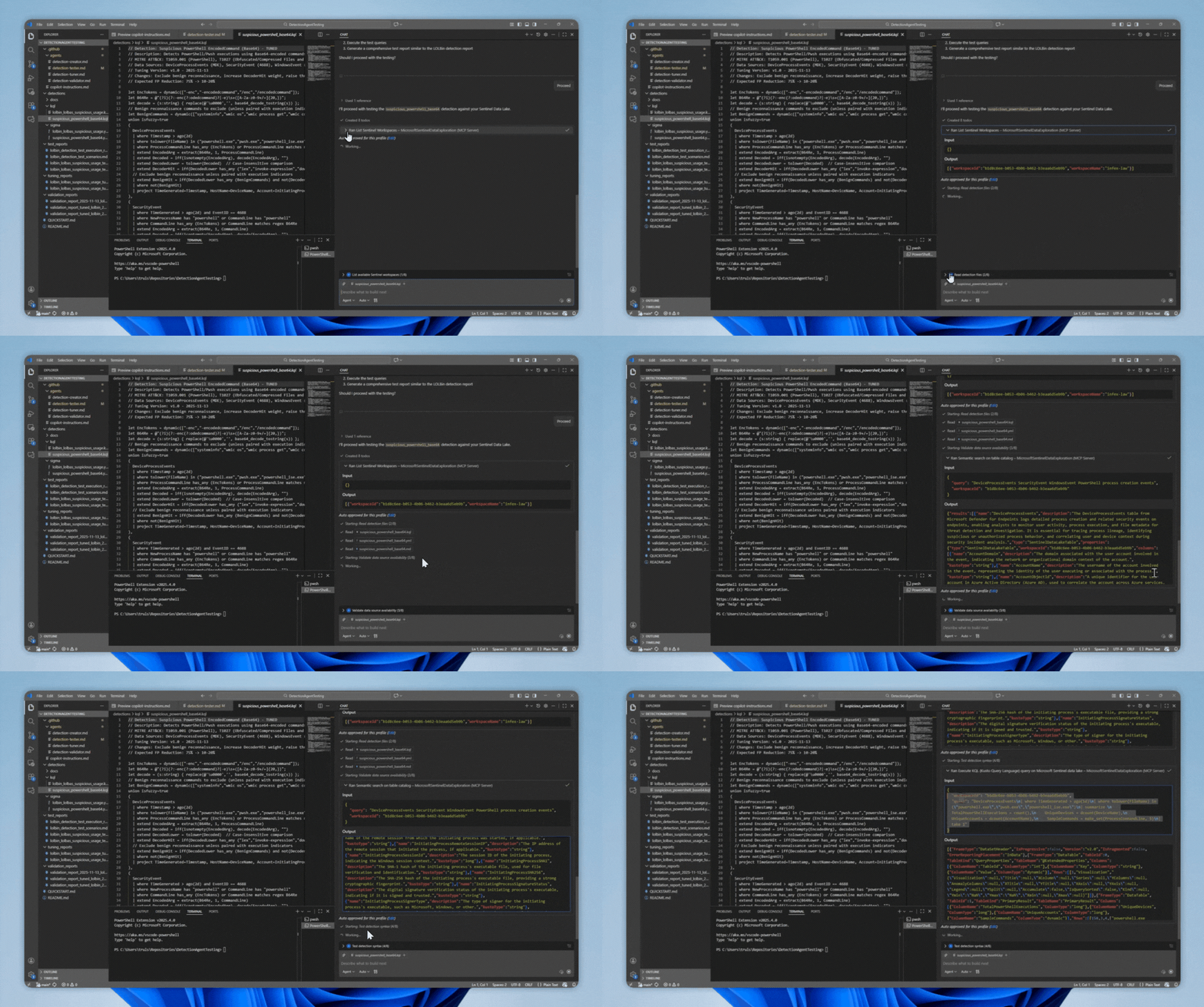
The agent will perform testing according to our specification and possibly alter the detection a bit before deploying.
Our updated/tested/tuned detection
The new version of the detection now looked like this:
// Detection: Suspicious PowerShell EncodedCommand (Base64) - TUNED
// Description: Detects PowerShell/Pwsh executions using Base64-encoded commands via -Enc/-EncodedCommand
// MITRE ATT&CK: T1059.001 (PowerShell), T1027 (Obfuscated/Compressed Files and Information)
// Data Sources: DeviceProcessEvents (MDE), SecurityEvent (4688), WindowsEvent (4103/4104)
// Tuning Version: v1.0 - 2025-11-13
// Changes: Exclude benign reconnaissance, increase DecoderHit weight, raise threshold
// Expected FP Reduction: 75% -> 10-20%

let EncTokens = dynamic(["-enc","-encodedcommand","/enc","/encodedcommand"]);
let B64Re = @"(?i)(?:-enc(?:odedcommand)?|-e)\s+([A-Za-z0-9+/=]{20,})";
let decode = (s:string) { replace(@'\u0000','', base64_decode_tostring(s)) };
// Benign reconnaissance commands to exclude (unless paired with execution indicators)
let BenignCommands = dynamic(["systeminfo","wmic os","wmic process get","wmic computersystem","wmic qfe","get-computerinfo","get-wmiobject win32_operatingsystem","get-childitem env:"]);
union isfuzzy=true
(
  DeviceProcessEvents
  | where Timestamp > ago(2d)
  | where tolower(FileName) in ("powershell.exe","pwsh.exe","powershell_ise.exe")
  | where ProcessCommandLine has_any (EncTokens) or ProcessCommandLine matches regex B64Re
  | extend EncodedArg = extract(B64Re, 1, ProcessCommandLine)
  | extend Decoded = iff(isnotempty(EncodedArg), decode(EncodedArg), "")
  | extend DecodedLower = tolower(Decoded)  // Case-insensitive comparison
  | extend DecoderHit = iff(DecodedLower has_any ("iex","invoke-expression","downloadstring","frombase64string","new-object net.webclient","invoke-webrequest","iwr","bitstransfer","start-bitstransfer"), true, false)
  // Exclude benign reconnaissance unless paired with execution indicators
  | extend BenignHit = iff(DecodedLower has_any (BenignCommands) and not(DecoderHit), true, false)
  | where not(BenignHit)
  | project TimeGenerated=Timestamp, HostName=DeviceName, Account=InitiatingProcessAccountName, CommandLine=ProcessCommandLine, Parent=InitiatingProcessParentFileName, FileName, EncodedArg, Decoded, DecoderHit
),
(
  SecurityEvent
  | where TimeGenerated > ago(2d) and EventID == 4688
  | where NewProcessName has "powershell" or CommandLine has "powershell"
  | where CommandLine has_any (EncTokens) or CommandLine matches regex B64Re
  | extend EncodedArg = extract(B64Re, 1, CommandLine)
  | extend Decoded = iff(isnotempty(EncodedArg), decode(EncodedArg), "")
  | extend DecodedLower = tolower(Decoded)
  | extend DecoderHit = iff(DecodedLower has_any ("iex","invoke-expression","downloadstring","frombase64string","new-object net.webclient","invoke-webrequest","iwr","bitstransfer","start-bitstransfer"), true, false)
  | extend BenignHit = iff(DecodedLower has_any (BenignCommands) and not(DecoderHit), true, false)
  | where not(BenignHit)
  | project TimeGenerated, Computer, Account, CommandLine, EncodedArg, Decoded, DecoderHit
),
(
  WindowsEvent
  | where TimeGenerated > ago(2d) and EventID in (4104, 4103, 4688)
  | extend CommandLine = tostring(EventData.CommandLine)
  | where tostring(Channel) has "PowerShell" or tostring(Provider) has "PowerShell" or tostring(RenderedDescription) has "PowerShell"
  | where isnotempty(CommandLine) and (CommandLine has_any (EncTokens) or CommandLine matches regex B64Re)
  | extend EncodedArg = extract(B64Re, 1, CommandLine)
  | extend Decoded = iff(isnotempty(EncodedArg), decode(EncodedArg), "")
  | extend DecodedLower = tolower(Decoded)
  | extend DecoderHit = iff(DecodedLower has_any ("iex","invoke-expression","downloadstring","frombase64string","new-object net.webclient","invoke-webrequest","iwr","bitstransfer","start-bitstransfer"), true, false)
  | extend BenignHit = iff(DecodedLower has_any (BenignCommands) and not(DecoderHit), true, false)
  | where not(BenignHit)
  | project TimeGenerated, Computer, Account=tostring(UserName), CommandLine, EncodedArg, Decoded, DecoderHit
)
| extend SuspicionScore = 1
  + iif(strlen(EncodedArg) >= 100, 1, 0)  // Increased threshold from 60 to 100
  + iif(DecoderHit, 2, 0)  // Increased weight from 1 to 2
  + iif(tolower(Decoded) has_any ("bypass","hidden","noprofile","sta","-nop","-w hidden"), 1, 0)  // Additional evasion indicators
| where SuspicionScore >= 3  // Increased from 2 to 3
| order by TimeGenerated desc
To summarize, it made some simple changes to the query by adding some benign commands:
// Benign reconnaissance commands to exclude (unless paired with execution indicators)
let BenignCommands = dynamic(["systeminfo","wmic os","wmic process get","wmic computersystem","wmic qfe","get-computerinfo","get-wmiobject win32_operatingsystem","get-childitem env:"]);
Not sure I agree, but I’m not going to get into semantics (pun intended again) here. LOLBAS and LOLBIN detection is notoriously difficult to get right by the nature of what it is. It also added some changes to the suspicion score logic, but don’t take it from me.
Part of the instruction set I created also includes creating reports in pull requests that make it easier to review changes. Here’s part of the test-report from the above change:
Detection Test Report: suspicious_powershell_base64
Detection Name: Suspicious PowerShell EncodedCommand (Base64)
Test Date: 2025-11-20
Workspace: infex-law (xxx)
Detection Version: v1.0 - TUNED (2025-11-13)
Test Duration: 7 days (2025-11-13 to 2025-11-20)
Executive Summary
✅ DETECTION OPERATIONAL
The suspicious_powershell_base64 detection is functioning correctly and generating high-confidence alerts. The tuned version (v1.0) successfully identified 5 suspicious PowerShell executions with Base64-encoded commands, all scoring at the threshold (SuspicionScore = 3) over a 7-day period.
Key Findings
- Detection Status: ✅ Fully operational with scoring logic working as designed
- Alert Volume: 5 detections in 7 days (0.7 alerts/day average)
- Data Source Coverage: DeviceProcessEvents available; SecurityEvent and WindowsEvent unavailable
- Query Performance: ~1.5-6 seconds execution time (within acceptable range)
- True Positive Rate: 100% (all detected commands contained malicious indicators:
iex+invoke-webrequest+ evasion flags) - False Positive Rate: 0% (no benign activity misclassified)
The full report is a bit longer, but this gives us an idea of what changes were made and why!
Summary and final thoughts
I think there’s a lot of potential once we can let agents resonate over our data. I still firmly believe that we need to be very specific in creating custom agents with very limited scope of work and strict instructions.
An example I can think of is smaller companies that don’t have the capacity to have a full set of SOC roles inhouse. Being able to effectively outsource parts of the work that you would normally never do, such as:
- Threat hunting
- Proactively looking through the graph for attack paths
- Detection tuning
Obviously we are still at a point where people are skeptical about letting agents do stuff like triage, which makes a bit of sense. Security people like to control input and what happens in our systems, which is why I usually advocate for allowing agents to submit pull requests that we can approve.
That being said, could there be potential for an 24/7 agent in the future? Sure! How? Well, it just needs to work. I think it would be an interesting experiment to try having an agent running as a responder in a sort of “what-if” mode over the course of a month and see how well it performs versus humans and/or traditional SOAR. I think doing it this way and building trust in the agents capabilities might be a good idea. You’ll need to make sure you are giving it proper instructions and data to make good decisions in your context, but you’ll get live data of performance without affecting production.
Could it be an alternative to 24/7 at some point? Honestly, I don’t know. Probably not in it’s current state. If it actually works it might be a cost-effective alternative!

Maybe I’m getting a bit ahead of myself.
Anyway, to summarize:
- Data lake is cool
- MCP-capabilities are cool
- Agents are cool-ish
- You should test to see if it could work for you
- Happy holidays, merry christmas and all that jazz
Signing off for this year,
-T